1Learning Outcomes
Use a pre-populated page table to translate virtual addresses into physical addresses.
Define a page fault and identify when an address translation scenario triggers a page fault.
Explain, at a high-level, the operating system’s role in address translation and handling page faults with context switches.
🎥 Lecture Video
In this section we discuss:
How to do address translation when the data requested is in memory, i.e., no page fault occurs.
How to do address translation when the data requested is not in memory, i.e., a page fault occurs.
What is the “memory manager,” i.e., the system performs address translation (see this section).
2Page Tables, Briefly
A page table keeps tracks of the VPN-to-PPN mappings for a given process. There is one page table per process.
Each entry in a page table corresponds to a virtual page number (VPN) for this process. In this course, the number of entries in a process’s page table is equivalent to the total number of virtual pages for the process.[1]
If a page is in memory, the entry is valid and has the corresponding physical page number. Otherwise, it may have garbage, and accessing this entry should trigger a page fault.
We discuss the fine-grained details of page tables in another section.
3Address Translation, Conceptually
3.1Case I: Page Is In Memory
Consider a scenario where a process has a 32-bit virtual address space, and physical memory is 16 KiB and paged into four 4 KiB pages. There are four steps to address translation, as shown by Figure 1’s animation. Fow now, conceptually, a page table entry is valid if it has a physical page number (PPN) and invalid if it is labeled “disk”.
Figure 1:Address Translation, Case I: The target page is in memory.
Explanation for Figure 1
Program requests a memory access at a virtual address (VA). Here, load byte @ address
0xFFFF F004to registert0. The value0xFFFF F004is a virtual address (VA).Translate the virtual address to physical address (i.e., location in memory).
Extract the virtual page number (VPN) from the VA. The lower 12 bits of each address are reserved for the page offset (4 KiB pages = 212 B pages), so the VPN is the upper 20 bits of VA, or
0xFFFFF.
Construct the physical address (PA). The entry associated with VPN
0xFFFFFhas a valid page table entry. Access the entry for the physical page number (PPN,0x2) and concatenate it with offset0x004to construct physical address0x1004.Access memory at the physical address in memory and return to the process. Here, the byte @ address
0x1004is read and returned to the process.
This case is predicated on our page table entry being valid. A valid page table entry means that the virtual page has a corresponding physical page number, and therefore the page is in memory. Next, let’s explore when the page is not in memory.
3.2Case II: Page Fault
We continue our scenario with the same process. Now, suppose that the next memory access triggers a page fault, as shown in Figure 2’s animation.
Figure 2:Address Translation, Case II: The target page is not in memory, triggering a page fault. With demand paging, a page fault means the page is fetched from disk.
Explanation for Figure 2
Program requests a memory access at a virtual address (VA). Here, load byte @ address
0x6000 0030to registert0. The value0x6000 0030is a virtual address (VA).Translate the virtual address to physical address (i.e., location in memory).
Extract the virtual page number (VPN) from the VA. The lower 12 bits of each address are reserved for the page offset (4 KiB pages = 212 B pages), so the VPN is the upper 20 bits of VA, or
0x60000.
Construct the physical address (PA).
The entry associated with VPN
0x60000does not have a valid page table entry. An invalid page table entry means that the physical page is not in memory.Ask the OS to perform an interrupt to request the page from disk (see details in this section).
Once the page is loaded from disk into memory (about a million cycles later[2]), resume the address translation.
The entry associated with VPN
0x60000(now) has a valid page table entry. Access the entry for the physical page number (PPN,0x2) and concanate it with offset0x030to construct physical address0x2030.
Access memory at the physical address in memory and return to the process. Here, the byte @ address
0x2030is read and returned to the process.
3.3Revisiting the Library Analogy
Let’s understand virtual memory using our library analogy of the memory hierarchy.
The book title is like a virtual address, and the Library of Congress call number is like a physical address. We usually remember a book by its title (VA), and not its call number (PA).
The card catalog is like a page table, which maps from book title to call number. If we went straight to the bookshelves to find a book number without the call number, we likely wouldn’t find the book. So the card catalog (page table) is important.
The corresponding card entry in the catalog has useful information:
Valid bit: Does the book exist in this library? (Is the page in memory?) Or do you need to request a hold and be notified when the book is available in the library? (Trigger a page fault and notify when page is loaded from disk into memory?)
Access bit: Can you check out this book, or is it reference-only? (We discuss memory page access rights more in this section.)
This analogy breaks down slightly because the page table is a page number lookup, not an address lookup. But we hope the weak analogy helps.
4The “Memory Manager”
Virtual memory manages the two levels of the memory hierarchy represented by main memory and disk. The “memory manager” performs translation and data mangement and is a combination of hardware (in the CPU) and software (the OS).
There is address translation hardware in the CPU; it is called a memory management unit. This hardware unit splits the virtual address into the virtual page number and offset within the page and accesses the page table. If the page is not currently in memory, the hardware raises a page fault exception.
Upon this page fault exception, transfer control the page fault exception handler—a supervisor-level OS procedure that performs the following:
Initiates transfer between memory and disk.
If out of memory, first select a page to replace in memory.
If needed, write the outgoing page to disk.
Load the requested page from disk into memory.
Perform a context switch so that another user process can use the CPU while the disk transfer happens.
Following the page fault, re-execute the instruction.
5Demand Paging
As mentioned in an earlier section, the OS also performs the load part of CALL—meaning, the OS loads a program into a new virtual address space and runs it. Upon starting this new process, what is its memory footprint? No matter what, the OS must allocate enough space in memory for a new page table for this process. But what about memory pages corresponding to data and instructions?
Preloading in numerous pages for every new process is wasteful. For example, with tiny programs like “Hello World”, most pages are never used, so allocating the full virtual address space to memory at startup (i.e., assign every virtual page to a physical page in memory) seems nonsensical.
In a system that uses demand paging,[3] a process begins execution with none of its pages in physical memory. In other words, all of its page table entries are invalid. Then, when a page is actually requested, load the page from disk into memory.
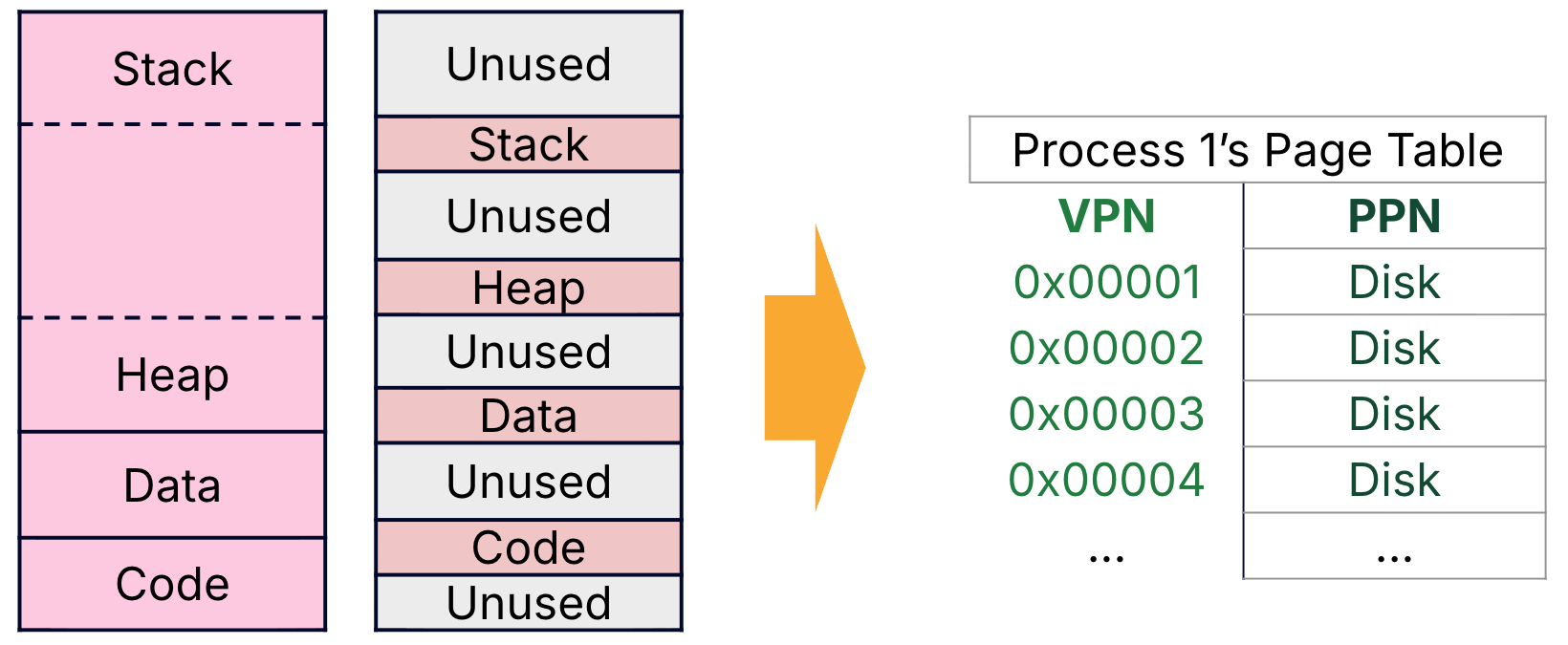
Figure 3:Our VM abstraction allows a program to use the full virtual address space, but some programs use only a tiny amount of memory. Demand paging means that new processes have page tables that start with entries that are all invalid.
Demand paging prevents over-allocating memory to a process (and thereby supports running many processes on a limited amount of memory), but the startup cost is high for new processes.
We assume a single-level page table hierarchy in this course. In practice, multi-level (hierarchical) page tables are used to reduce the size of the page table. Read more in the extra section.
Jim Gray’s analogy figure for your reference.
Read more on Wikipedia about demand paging and its counterpart, anticipatory paging.